
 OnceHub
 ScheduleOnce

The Booking Calendar Owner
The Booking Calendar Owner is the primary user authorized to manage and edit a Booking Calendar’s configuration settings. By default, the user who creates a Booking Calendar is automatically designated as its Owner.
What Can the Booking Calendar Owner Do?
Section titled “What Can the Booking Calendar Owner Do?”The Booking Calendar Owner’s ability to edit an owned booking calendar depends on the Owner’s assigned user role:
- Member: Can edit all settings except for changing the Host.
- Team Manager: Can edit all settings including changing the Host for their managed teams.
- Administrator / Account Owner: These roles are stronger than individual object permissions. They can edit all settings across all Booking Calendars on the account regardless if they are an owner or not.
Changing the Booking Calendar Owner
Section titled “Changing the Booking Calendar Owner”Permission to update ownership depends on your user role:
- Member: Cannot assign or change Booking Calendar Owners.
- Team Manager: Can set any member of their specific team as the Owner.
- Administrator/Account Owner: Can set any user on the account as the Owner.
How to Change the Booking Calendar Owner
Section titled “How to Change the Booking Calendar Owner”Follow these steps to update ownership for an existing Booking Calendar:
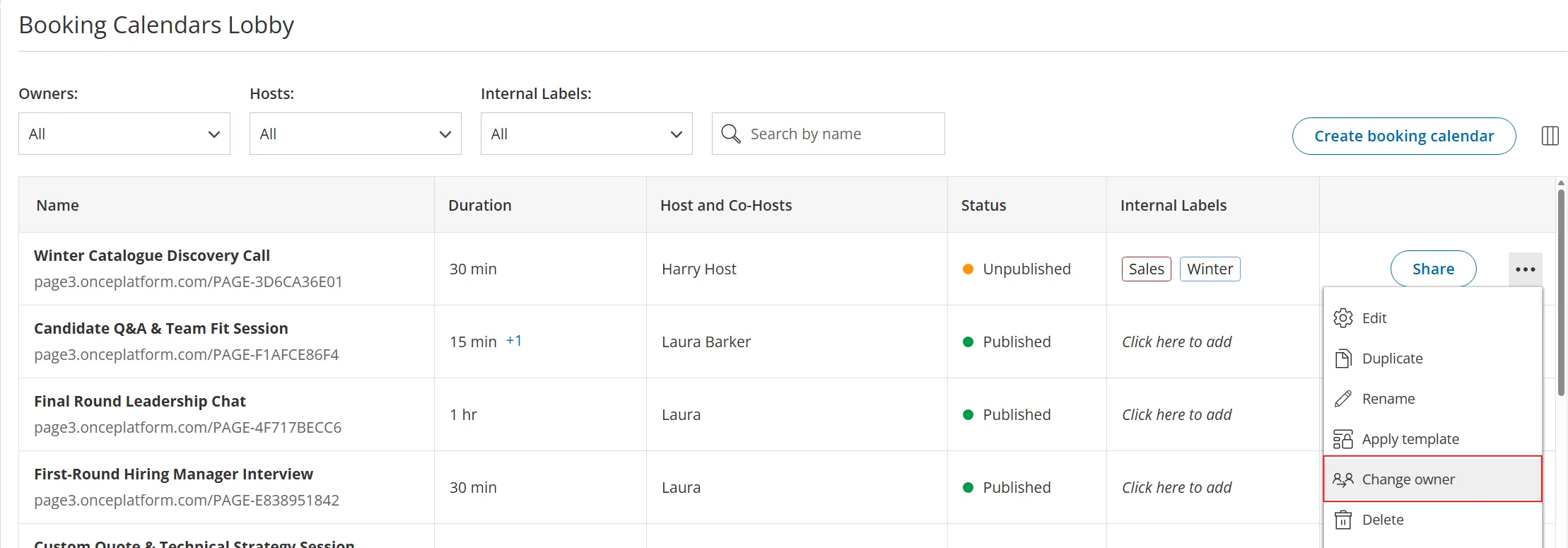
- Navigate to Booking Calendars in the left-hand menu.
- Click the three-dot menu to the right of the Booking Calendar.
- Select Change owner.
- Select the new Owner from the dropdown.
- Click Save to apply the change.
Booking Calendar Owner Vs. Host
Section titled “Booking Calendar Owner Vs. Host”The Owner and Host serve distinct roles and do not need to be the same user.
- The Owner manages and configures the Booking Calendar settings.
- The Host conducts the meetings booked through the Booking Calendar.
The ability to change the Host depends on the Owner’s user role:
- Member: Cannot change the Host.
- Team Manager: Can change the Host to themselves or to a member of their team.
- Administrator/Account Owner: Can change the Host to any user on the account.
A Special Note When a Booking Calendar Uses a Team of Hosts With Custom Availability
Section titled “A Special Note When a Booking Calendar Uses a Team of Hosts With Custom Availability”When a Booking Calendar is set to use customize availability and locations for some hosts, the following rules apply:
- Any user who is part of the Host or Co-Host team of the Booking Calendar can update their own availability on the Booking Calendar.
- Team Managers can update availability for any Host or Co-Host on their team.
© Copyright 2026 OnceHub. All rights reserved.